
Top Free Zoo Tycoon Mobile & Browser Games to Play Now
What Makes a Great Zoo Tycoon Mobile Game
A top-tier zoo tycoon mobile game nails smooth UI for quick building and animal management on small screens. Players want straightforward resource loops that keep upgrades meaningful without grinding. Variety in animals, attractions, and customization drives replayability—mixing classic species with unique hybrids or themed zones spices up the park design.
Key gameplay traits include:
- Efficient resource management that supports short bursts of play
- Clear progression with incremental unlocks and upgrade paths
- Responsive controls tailored for touch and tap input
- Engaging day/night cycles or events to break monotony
Games that balance depth with accessibility win mobile crowds, especially those offering creative sandbox modes alongside objective-driven scenarios.
Instant Play + Mobile Friendly Picks
Instant play is a must for mobile zoo tycoon titles—no downloads means anyone can jump in during breaks. Browser-based games optimized for mobile loads fast and scale well on both iPad and smaller smartphone screens.
Recommended picks feature:
- Fully responsive design working seamlessly on Safari and Chrome for iPad
- Minimal loading times with cloud saves to pick up progress anywhere
- Touch-friendly menus that avoid tiny icons or complicated drag-drop mechanics
- Offline-compatible elements or background idle progression to maximize short sessions
If you want to test the waters first, look for “zoo tycoon on iPad” games tagged as no-install instant play. These demo true zoo-building thrills without app store friction.
Free Games Overview
Free browser zoo tycoon games combine easy accessibility with solid gameplay loops for casual and dedicated players alike. Many rely on ad-supported models but maintain player-friendly upgrade pacing to avoid paywalls.
Notable free titles often feature:
- Incremental park expansion combined with animal breeding or genetics
- Idle income systems that reward consistent check-ins without forcing play
- Social leaderboards or light multiplayer modes for competition
- Clean, colorful graphics optimized for prolonged mobile play
Explore Popcorn Games’ zoo tycoon games hub for instant access to free, no-download zoo simulators perfect for any mobile browser user.
How to Play Zoo Tycoon on iPad Without Downloads
Using Browser Games on iPad
Playing zoo tycoon style games on an iPad without downloads is easy thanks to modern browsers like Safari and Chrome. These browsers support rich HTML5 games that load instantly and run smoothly on touchscreens. Just navigate to a trusted browser gaming platform, search for “zoo tycoon on iPad,” and start building your park immediately. No app stores, no installation delays.
Benefits of browser games on iPad include:
- Instant access with no storage use
- Touch-optimized controls designed for tap and swipe
- Cross-device progress via cloud saving on some platforms
- Quick session resumption anytime, anywhere
Recommended Settings for Smooth Play
To maximize your zoo tycoon experience on iPad browsers, a few simple settings help:
- Enable “Request Desktop Site” when UI seems limited (some games work better in desktop mode)
- Close unnecessary tabs and background apps to free up memory
- Use Wi-Fi for faster initial loading and cloud sync
- Adjust screen brightness and volume for comfortable gameplay during breaks
These tips reduce lag, prevent interface glitches, and ensure the touch controls respond as expected in your favorite games.
Mobile Web vs App Experience
Browser zoo tycoon games on iPad deliver a lightweight alternative to dedicated apps. While apps often provide deeper graphics and offline capabilities, browser versions shine with their zero install barrier and instant availability. The trade-off usually involves simpler visuals and occasional reliance on a steady internet connection.
Compare key points:
| Feature | Browser Zoo Games on iPad | Zoo Tycoon Mobile Apps |
|---|---|---|
| Installation | None, play instantly | Required from App Store |
| File Size | Minimal, runs in-browser | Larger, uses device storage |
| Updates | Automatic, always latest version | Manual updates |
| Offline Play | Limited or none | Usually available |
| Touch Controls | Optimized but game dependent | Designed specifically for mobile |
For casual sessions or fresh players, browser games on iPad offer unmatched convenience and fast access to zoo building fun without the app hassle. If you want a deep dive with offline play, apps are better—but expect longer setup and updates.
Browser Zoo Games Mobile: Exploring Casual and Idle Animal Park Games
Idle Zoo Games for Short Sessions
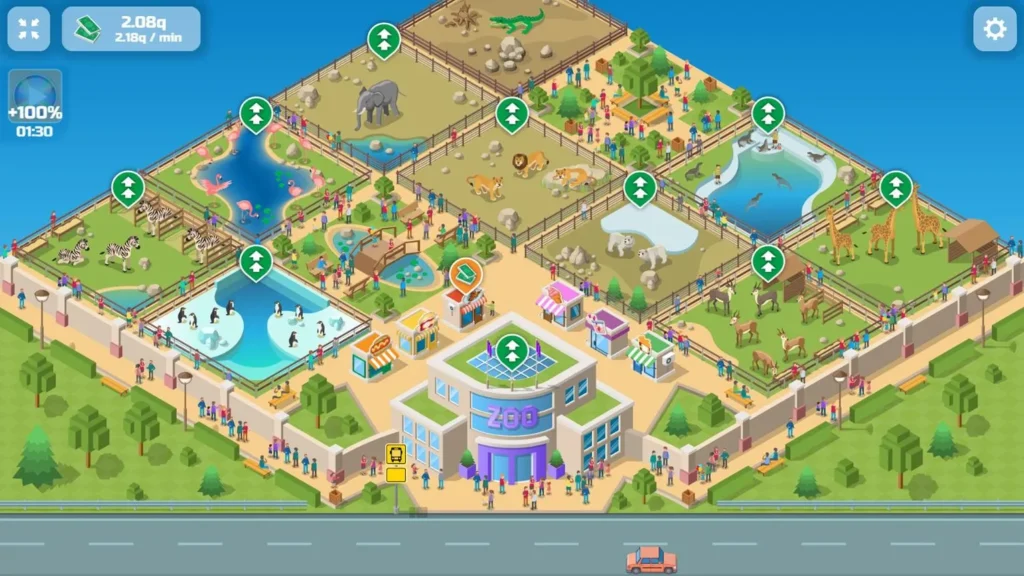
Idle zoo games on mobile browsers are built around quick entry and rewarding returns. They let you collect income from your animals automatically, so even brief breaks turn into progress. The gameplay usually involves upgrading enclosures and unlocking new species with minimal taps.
Key features include:
- Passive resource gathering means no pressure to grind
- Fast upgrade cycles keep goals fresh within short play bursts
- Lightweight graphics ensure smooth performance on older devices
- Perfect for “check-in” gameplay during commutes or coffee breaks
Compared to complex simulation games, these idle titles focus on accessibility and replayability through incremental progression, fitting casual players who want satisfying loop-based gameplay without heavy management.
Animal Clicker Games That Keep You Hooked
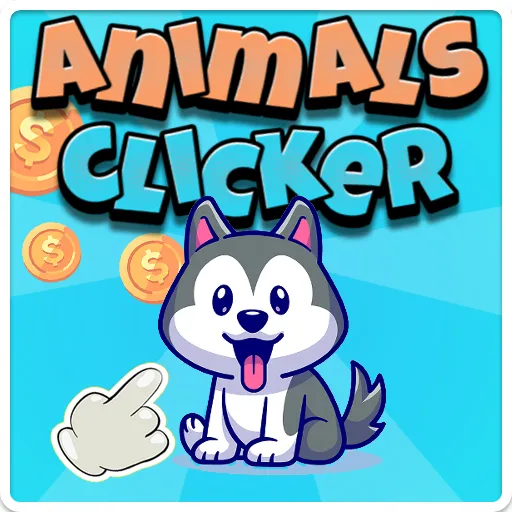
Animal clicker games mix zoo theme with clicker mechanics for addictive, hands-on interaction. The core loop is tapping animals or attractions to generate resources, then reinvesting those earnings in growth.
What sets them apart:
- Immediate feedback and simple tap control encourage continuous play
- Upgrades often unlock combos or boost multipliers to keep momentum rising
- Social or leaderboard features add light competitive drive on some platforms
- Combines visual charm with gameplay pacing that fits quick or longer sessions
While clicker games offer less sandbox depth than full tycoon sims, they excel in engaging players who enjoy active, repetitive reward cycles. They’re a solid choice among animal clicker games with optimized touch controls for browsers on mobile devices.
Why Browser-Based Zoo Games Are Perfect for Breaks
Browser zoo games on mobile capitalize on instant availability and session-friendly design. No downloads means zero friction for spontaneous play. This suits casual gamers aiming for quick fun rather than lengthy management marathons.
Benefits for break-time gaming:
- Starts instantly on any mobile browser with no setup delays
- Controls designed for tap/swipe interactions ideal for on-the-go use
- Sessions easily paused and resumed without losing progress
- Mix of idle and active mechanics supports diverse player moods
A casual pace combined with colorful animal management keeps players coming back. For more titles blending these traits, explore our idle games collection or jump into the free idle zoo game for a test drive.
Comparing Zoo Tycoon Mobile Games: Features, Replayability & Mobile Optimization
Mobile Friendly Controls & UI
Smooth controls separate good from great in zoo tycoon mobile titles. Look for:
- Intuitive tap and drag mechanics designed for fingers, avoiding pixel hunting
- Scalable UI elements that adjust to different screen sizes, especially iPad vs phone
- Clear visual feedback like button highlights and quick tooltips to speed building decisions
- Minimal loading screens between menus to maintain game flow on slower mobile connections
Games that nail touch controls cut frustration, letting players spend more time expanding and customizing rather than fiddling with clunky interfaces. Hybrid control schemes combining tap-to-place with pinch-to-zoom usually feel more natural on iPad browsers, enhancing usability.
Replay Value and Progression Systems
Replayability depends heavily on how players progress their zoo and unlock new features. Top mobile zoo games balance:
- Gradual unlocks with meaningful upgrades that impact income and aesthetics
- Diverse animal collections ranging from common to exotic, incentivizing collection completion
- Event-based challenges or limited-time content that refresh gameplay with rewards
- Sandbox or creative modes offering open-ended park design beyond standard objectives
Progression loops that reward both playtime and strategic planning keep players hooked. Titles with layered upgrades—like genetic crossbreeding or attraction customization—hold attention longer than straightforward expansion sims. Browser games often layer idle income mechanics to smooth resource pacing across sessions.
Casual vs Competitive Gameplay Loops
Zoo tycoon mobile games typically lean casual, but some add competitive elements to extend engagement. Differences include:
- Casual loops: Focus on relaxed park building, collecting animals, and light management. No rush, ideal for short sessions and stress-free progress.
- Competitive loops: Incorporate leaderboards, timed events, or direct player challenges. Requires optimized resource use, faster upgrades, and often matchmaking queues.
Competitive titles demand more active play and strategy, appealing to players seeking leaderboard grind or multiplayer interaction. Casual games excel for players wanting casual pacing and creative expression without pressure.
When choosing, consider if you want a laid-back zoo sandbox or a more intense upgrade race with friend leaderboards. Some games blend these, letting you switch between chill build mode and competitive events seamlessly.
For more on casual tycoon games and mobile options, see our detailed casual tycoon games and mobile tycoon games online guides.
FAQ: Playing Zoo Tycoon Games on Mobile Browsers and iPads
Can I Play Zoo Tycoon Games for Free on My iPad?
Yes, many browser-based zoo tycoon games are free to play on iPads with no downloads required. You simply open Safari or Chrome, visit a gaming site, and start building instantly. Free titles often include in-game ads but avoid heavy paywalls, so you can manage your zoo fully without spending.
Do These Games Require Internet After Loading?
Most browser zoo tycoon games need an active internet connection to sync progress and load new content. Some offer limited offline features like idle income accumulation, but the full gameplay usually requires being online. Save progress regularly to the cloud to avoid data loss when switching networks.
Which Browser Works Best for Mobile Zoo Games?
Safari on iPad is typically the best choice for mobile zoo tycoon games due to optimized touch support and stable HTML5 performance. Chrome also works well but may use more memory. Avoid browsers with heavy extensions or trackers, as these can slow loading times and cause interface glitches during gameplay.
Discover More Fun: Explore Related Casual & Idle Games on Popcorn Games
Browse More Idle & Zoo Style Games
Popcorn Games hosts a variety of casual and idle titles beyond just zoo tycoon mobile games. These picks streamline animal park management with session-friendly gameplay loops and light progression systems. Look for games featuring:
- Incremental upgrades that reward short bursts of engagement
- Animal collections mixed with creative park building
- Idle resource mechanics keeping progress ticking even when offline
- Simple tap controls optimized for mobile browsers
Exploring related idle games and zoo-style simulators here expands your options for quick, fun play sessions on any device.
Why Instant Play Matters for Casual Gamers
For casual players, the barrier to entry can kill the fun. Instant play means zero waiting, no installs, and no commitment before testing a game’s vibe. This matters because:
- You can jump into a new game anytime, anywhere—even on short breaks
- Trying multiple titles quickly helps find your favorite gameplay style
- Instant play supports spontaneous, stress-free gaming without filling device storage
- Browser-based games load fast, keeping momentum high for casual users
Popcorn Games specializes in instant access, helping casual gamers discover hits fast without friction.
How to Make the Most of Popcorn Games’ Free Library
Maximize your gameplay on Popcorn Games by taking advantage of its features designed for casual and mobile players:
- Bookmark favorite zoo and idle games for quick relaunches
- Use mobile-friendly browsers like Safari or Chrome for smooth sessions
- Explore related categories like animal clicker games to vary gameplay without installing apps
- Jump across multiple titles to avoid burnout and keep gameplay fresh
With no downloads and a constantly refreshed free library, Popcorn Games is a go-to spot to find your next casual favorite and keep your gameplay loop lively across short or longer sessions. Visit the home page for instant game access.