
Decoding Wrestle Bros Keyboard Controls Setup: What Each Key Does
Movement Keys
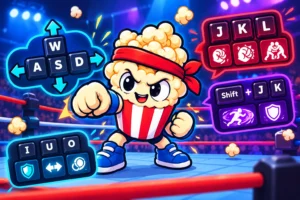
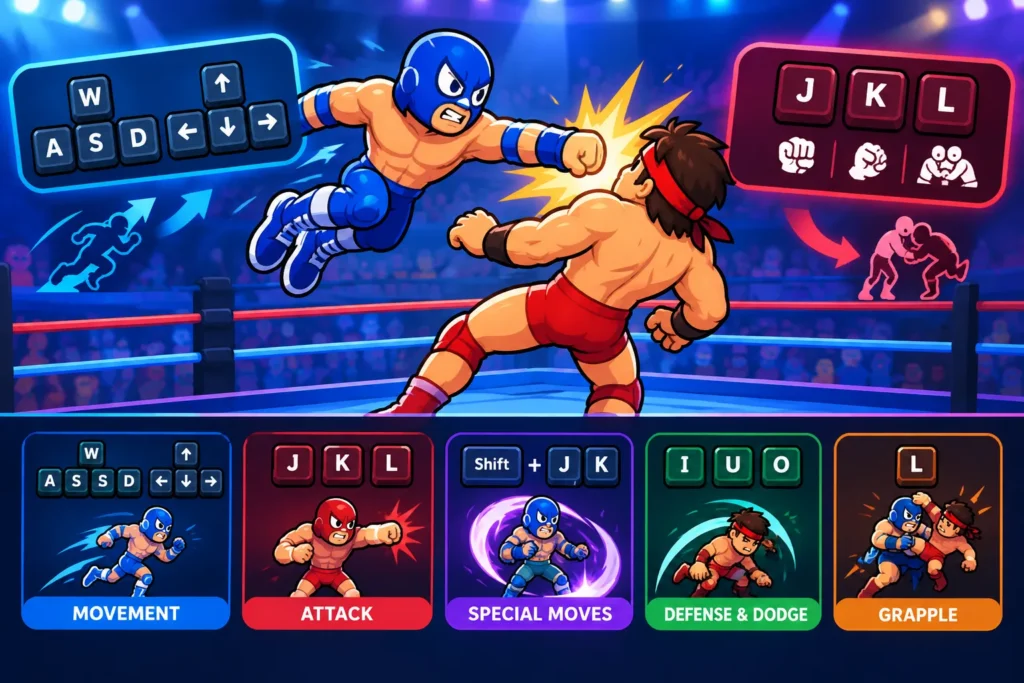
Movement in Wrestle Bros relies on straightforward keyboard inputs that give you tight control over your wrestler’s positioning. Use the arrow keys or WASD for directional movement:
– Left/Right: Walk or run towards opponents or evade attacks
– Up: Climb ropes or attempt aerial moves when near corners
– Down: Crouch for dodging low strikes or prepping grapples
This setup keeps movement intuitive, allowing for rapid shifts between offense and defense with minimal finger stretch. Compared to other wrestling browser games, the option to pick arrow keys or WASD offers comfort whether you prefer traditional layouts or PC gaming standards.
Attack and Grapple Buttons
Wrestle Bros assigns core attack and grapple actions to keys clustered around easy reach zones:
– J: Light punch or quick strike, good for combo starters
– K: Heavy attack, slower but high damage
– L: Grapple button to initiate holds and throws
Mastering the timing between these buttons defines your offensive flow. Light attacks chain well into grapples, while heavy attacks punch through defenses but leave you vulnerable if missed. This layered control scheme balances simplicity with depth, perfect for quick sessions and longer practice alike.
Special Move Triggers
Special moves add flair and tactical depth with keyboard triggers often involving simultaneous key presses or directional + attack combos:
– Shift + J/K: Perform signature power moves, consuming stamina
– Down + L: Counter-grapple, useful for reversing opponent attacks
– Combos often require holding a direction briefly before hitting the attack key
These keyboard combos reward timing and muscle memory, distinguishing casual button mashing from deliberate play. Special triggers encourage mastering control nuances, making each match feel dynamic and responsive.
Defense and Dodge Controls
Defense keys help maintain your wrestler’s longevity and open offensive opportunities through counters:
– I: Block incoming strikes, reducing damage but draining stamina
– U: Dodge left or right with quick lateral moves
– O: Roll out of grapples or get up faster after being downed
Effective defense relies on quick reflexes with these keys and knowing when to transition to offense. Compared to other wrestling browser games controls, Wrestle Bros offers a balanced defensive toolkit suitable for casual players and keyboard veterans alike.
For a full breakdown of all key mappings and setup tips, check out our detailed guide on wrestle bros controls. This resource dives deeper into keyboard customization and ideal layouts for smoother gameplay.
Multiplayer Wrestling Controls: Coordinating Moves Against Friends
Two-Player Keyboard Layouts
Wrestle Bros supports local multiplayer using a shared keyboard, which demands thoughtful key assignments to avoid finger clashes. Typically, one player uses WASD for movement with nearby keys like F, G, and H for attacks, while the second player relies on arrow keys plus J, K, L for strikes and grapples.
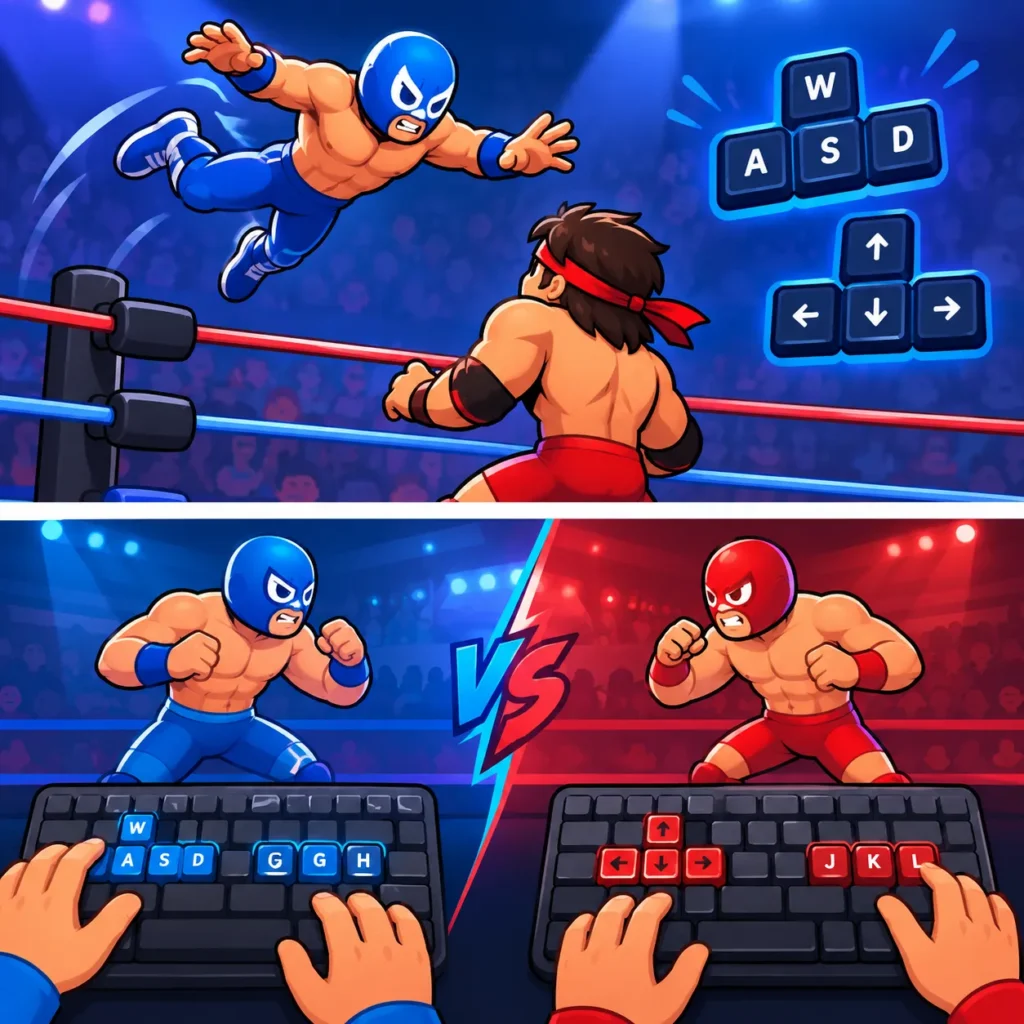
This setup keeps both players’ hands in comfortable zones, preventing overlap during intense exchanges. Unlike some multiplayer wrestling controls that force awkward stretches, Wrestle Bros lets friends compete side-by-side with minimal finger fatigue.
- Player 1: WASD + F/G/H
- Player 2: Arrow Keys + J/K/L
Adjusting sensitivity or swapping attack keys can further reduce clashes, improving responsiveness when the pace picks up.
Syncing Attacks and Defenses
Multiplayer matches hinge on balancing aggressive moves and timely blocks or dodges. Since both players share the keyboard, anticipating your opponent’s input rhythm is key for syncing successful combos and counters.
Using its distinct defense keys—such as I to block and U/O to dodge—helps you stay unpredictable. Coordinated defense followed by rapid counter grapples using the L or H keys can quickly turn the tide. This control synergy rewards players who communicate and practice together.
- Mix block (I), dodge (U/O), and quick grapples (L/H)
- Time counter-grapples with opponent’s attack patterns
- Use awareness of keyboard layout to prevent input errors
Effective defense combos separate casual button mashing from sharp multiplayer tactics here.
Timing and Combo Strategies
Success in Wrestle Bros multiplayer relies on mastering the timing of key sequences for combos—especially when playing against friends who react unpredictably. Combos often include chaining light punches into grapples or interrupting heavy attacks with dodges.
A solid strategy:
– Start combos with quick strikes (F/J) while baiting a reaction
– Follow up with a grapple key to lock opponents down
– Use Shift + attack keys sparingly to reserve stamina for clutch moments
Precision beats spamming—players who nail these timing windows quickly climb the local leaderboard grind. Unlike automated matchmaking games, Wrestle Bros encourages in-person practice to hone these keyboard combos efficiently.
For more on multitasking in fighting games, check out our guide on multiplayer fighting games. And if you want to discover more intense 2-player bouts, explore our full 2 players games library.
Hidden Keyboard Mechanics and Advanced Techniques in Wrestle Bros
Combos Requiring Precise Key Timing
Wrestle Bros shines when you master its combo timing window. Pulling off combos isn’t just about mashing buttons—success depends on hitting sequence keys with exact rhythm. Try this:
– Start with a fast light punch (J/F)
– Immediately follow with a grapple (L/H) as the animation ends
– Finish with a special move trigger (Shift + J/K) while holding a directional key
This timing creates a fluid attack chain that keeps opponents on defense. Unlike casual play, these key combos rely on sharp reflexes and muscle memory built through consistent practice.
Shortcut Keys for Quick Recovery
Recovery speed often decides rounds. Wrestle Bros hides shortcuts that speed up getting back on your feet or breaking out of holds:
– O instantly rolls out of certain grapples, bypassing longer struggle sequences
– Double-tapping Down speeds up crouch recovery and reduces cooldowns between moves
– Holding Up while stunned can prompt early stand-up animations
These shortcuts help maintain momentum in fast sessions where every second matters. Compared to other wrestling browser game controls, Wrestle Bros offers surprisingly responsive recovery tricks without complex inputs.
Mixing Grapples and Attacks Using Keyboard
Effective mix-ups between grapples and strikes create unpredictable gameplay. Wrestle Bros keyboard controls facilitate this with smart button placement allowing fluid transitions:
– Use L for grapple initiation but quickly switch to a light punch (J) if the opponent dodges
– Combine Down + L to trigger counter-grapples that punish aggressive foes
– Mix heavy attacks (K) with lateral movement (A/D or arrow keys) to close gaps before grappling
Mastering these combos keeps your playstyle dynamic and hard to read. This depth boosts replayability as you develop personalized key sequences tailored to your strengths.
Unlocking these hidden keyboard tricks gives an edge in both solo and multiplayer matches. For more browser wrestling game techniques and strategies, dive into our browser wrestling games coverage.
Common Keyboard Control Mistakes New Wrestle Bros Players Make
Overusing Attack Keys Without Defense
Many new players rush into offense by spamming attack keys like J and K without using defense controls. This leads to quick stamina drain and easy counters. Remember: blocking with I and dodging with U or O are just as crucial. Aggressive hitting without timely defense stalls your momentum and lowers survivability.
- Overuse leaves you open to grapples and special moves
- Stamina mismanagement happens fast without defense balance
- Mixing defense keys improves your attack windows and response time
Building a rhythm combining attacks and defense keys stops predictable play and sharpens your control flow.
Ignoring Movement Precision
Movement timing defines your positioning and combo success. New players often neglect left/right/up/down keys or overuse only basic walking without fine directional adjustments. This results in missed aerials and failed grapples.
- Use Up near ropes for aerial moves, crucial for stage advantage
- Crouching (Down) dodges low hits and readies counter-grapples
- Precise lateral movement sets up heavy attacks and spacing control
Mastering movement keys enhances your combo setup and defense effectiveness, a control nuance overlooked by beginners.
Mis-timing Grapple Attempts
Grapples in Wrestle Bros require tight timing linked to your opponent’s animation state. Pressing the grapple key L too early or too late wastes stamina and opens you to counters.
- Grapple too soon and opponents dodge or reverse easily
- Grapple late and miss combo follow-ups, losing offensive momentum
- Use Down + L to counter-grapple with proper timing during defense
Practice syncing grapple presses with attack animations and opponent signals to avoid frustrating failures. Correct timing extends your combo chain and increases win potential.
For a full control cheat sheet and to avoid common pitfalls, explore our detailed wrestle bros controls guide. It covers key layouts and timing strategies to polish your skills quickly.
Also, for expanding your multiplayer tactics beyond basics, check out Wrestle Bros on Popcorn Games to jump into matches that challenge your keyboard control precision.
Optimizing Your Setup: Keyboard Tips for Smooth Wrestle Bros Play on PC and Mobile
Browser Compatibility and Keyboard Lag
Browser choice impacts how responsive your keyboard inputs feel in Wrestle Bros. Chrome and Firefox generally provide the best results with low input lag. Edge and Safari can introduce occasional delays depending on system resources.
- Clear cache before playing to prevent slowdown
- Disable unnecessary extensions that affect keyboard capture
- Use wired keyboards on PC for consistent signal transmission
Mobile browsers add complexity with virtual keyboards. Chrome on Android offers decent key event support, while iOS Safari may lag behind in responsiveness. For mobile, external Bluetooth keyboards give superior control over touch.
Best Keyboard Layouts for Wrestle Bros
The default layout suits most players, but custom key mapping smooths aggressive and defensive transitions. Players often remap:
– Grapple to E or R to keep attacks clustered on home row
– Dodge keys (U/O) closer to pinky fingers for quicker reflexes
– Movement adapted to arrow keys or WASD depending on hand dominance
Try layouts maximizing finger travel efficiency to reduce fatigue in longer sessions. Adjust keybindings based on your grip and playstyle. This subtle customization boosts combo flow and reaction time.
Playing on Mobile: Keyboard vs Touch Controls
Wrestle Bros offers touch controls on mobile but they lack the precision of physical keyboards. Touch struggles with rapid combos and dodges compared to tactile keys.
- Bluetooth keyboards provide full control without compromising mobility
- Touch suits casual, slower-paced matches or beginners learning mechanics
- Hybrid gameplay: start on touch, switch to keyboard for competitive runs
Replayability improves with external keyboards on mobile, as you can execute timing-heavy combos smoothly. Until hardware is accessible, learning rhythm-based tap sequences helps bridge the gap.
For more on configuring your Wrestle Bros setup and polishing your keyboard skills, visit our home page for guides and instant-play browser games optimized for fast input.
Beyond Wrestle Bros: Games That Nail Multiplayer Wrestling Controls
Top Browser-Based Sports Games
If you like Wrestle Bros for its tight keyboard control, several browser sports games capture a similar feel with smooth multiplayer inputs. These titles focus on quick, responsive key presses that reward timing and precision rather than button mashing.
- Basketball Legends: Fast-paced shooting and passing controls optimized for keyboard combos. Great for players who want fluid multiplayer sessions with minimal input delay.
- Soccer Skills Arena: Uses simple keyboard movement and shooting keys but layers feints and tackles requiring timing akin to wrestling grapples.
- Table Tennis Pro: Small control set but demands perfect timing on returns, much like juggling attack and defense keys in wrestling.
Each delivers short-session gameplay ideal for browser launch and play, emphasizing control mastery over grind-heavy mechanics common in bigger titles. These games are great warm-ups before wrestling battles or for players who want varied sports action without downloads.
Multiplayer Wrestling Alternatives Worth Trying
Looking for other wrestling browser games with intuitive multiplayer controls? These alternatives balance accessible keyboard mappings with solid combat depth, making them solid options after Wrestle Bros.
- Wrestling Revolution 2D: More detailed keyboard combos including throws, blocks, and signature moves. It raises the combo complexity but keeps inputs clean.
- Ring Masters Online: Focuses on tag-team battles with dual-keyboard layouts supporting cooperative multiplayer on one PC, a nice step up in synergy demands.
- Pro Wrestler Clash: Offers customizable key settings and the ability to assign macros for repeated move combos, adding layers to competitive play.
Compared to Wrestle Bros’ straightforward setup, these games challenge your reaction speed and coordination in new ways while preserving the multiplayer wrestling core. They also often include online matchmaking to extend session replayability beyond local play.
Instant Play Games Without Downloads
One major draw of Wrestle Bros is its zero-install, browser-based accessibility. Several other instant-play wrestling and sports titles offer this same convenience, keeping control setups lightweight and responsive.
- Titles optimized for keyboard input with immediate load times
- Minimal distraction from plug-and-play controls, focusing on fast matchmaking and gameplay
- Games designed with session-based progression to keep you coming back for quick matches
This instant access model fits busy players who want smooth keyboard control without installation hassles or hardware triggers. Exploring these browser wrestling games and sports collections expands your arsenal for multiplayer sessions with friends or online opponents.
Explore more action-packed free online games in the sports games and arcade games categories to keep the momentum going after Wrestle Bros.
For multiplayer control techniques that cross game genres, check our series on multiplayer fighting games.